
Knowledge / Wired networks
Ethernet Cables Explained
A practical guide to Cat5e, Cat6 & Cat6A
Understand what the numbers mean, see what is inside the cable, and choose a connection that suits your home or business.
Choose for the job you need it to do.
Replacing a short lead behind the television is a different decision from wiring an office or connecting a ceiling access point. Our practical starting points are:
Existing wiring
Check before replacing
Good Cat5e can still be useful, including for suitable multi-gigabit links. Check the equipment, terminations and actual link performance before assuming the cable in the wall is obsolete.
Everyday connections
Cat6 is a sensible starting point
A well-made copper Cat6 patch lead is a practical option for a computer, television or ordinary Gigabit network. The correct length and reliable connectors matter more than a dramatic number on the packaging.
Planned 10 Gigabit wiring
Specify a Cat6A system
For a new installation designed for 10 Gbps over a full 100-metre channel, specify Cat6A cabling and matching components. Allow for the cable route, termination space and installation cost.
What do Cat5e, Cat6 and Cat6A mean?
“Cat” is short for category. It describes a set of electrical performance requirements for the cabling, including how well signals are kept apart and how much they weaken along the route. It is not a measurement of your internet speed.
Ethernet is the technology carrying data over the link. The familiar clip-in plug is commonly called RJ45; the connector used on these everyday network leads has eight positions and eight contacts, often written as 8P8C.
| Category | Speed and distance context | What it means in practice |
|---|---|---|
| Cat5 | Legacy cabling. Gigabit Ethernet was designed to work over qualifying four-pair Cat5 systems; “100 Mbps maximum” is too simplistic. | Treat installed Cat5 as something to assess, rather than a specification for new wiring. |
| Cat5e | 1 Gbps over a compliant 100 m channel. Suitable installations can also support 2.5/5 Gbps with compatible equipment and appropriate qualification. | Existing wiring may have more useful life than the Gigabit label suggests. Test before replacing it for a speed upgrade. |
| Cat6 | 1 Gbps over 100 m. 10 Gbps is possible over shorter channels; around 37–55 m is commonly discussed, with suitability dependent on interference and testing. | A practical option for many everyday links. Do not promise 10 Gbps at 55 m solely from the cable label. |
| Cat6A | 10 Gbps over a compliant 100 m channel. | The straightforward specification for new full-distance 10 Gigabit copper links, using a complete Cat6A system. |
| Cat7 / 7A | ISO/IEC categories used in shielded systems supporting 10 Gbps at 100 m. They are not recognised categories in the TIA cabling system. | The channel and connector requirements matter. A shop listing that says “Cat7 RJ45” does not by itself demonstrate a complete Class F/FA installation. |
| Cat8 | Specified for 25/40 Gbps applications over channels up to 30 m with compatible equipment. | Designed around short data-centre links. Its headline speed offers no automatic benefit to an ordinary home router or television. |
Technical background: Gigabit over Cat5; Cat6 and 10GBASE-T testing; cable-category history; Ethernet Alliance on 2.5/5 Gigabit.
MHz is not Mbps
A cable frequency rating, such as 250 MHz for Cat6 or 500 MHz for Cat6A, describes the frequency range over which its performance is specified. Mbps and Gbps describe data rates. They are related through the Ethernet signalling system, but you cannot convert one into the other with a simple multiplier.
A cable is one part of a system
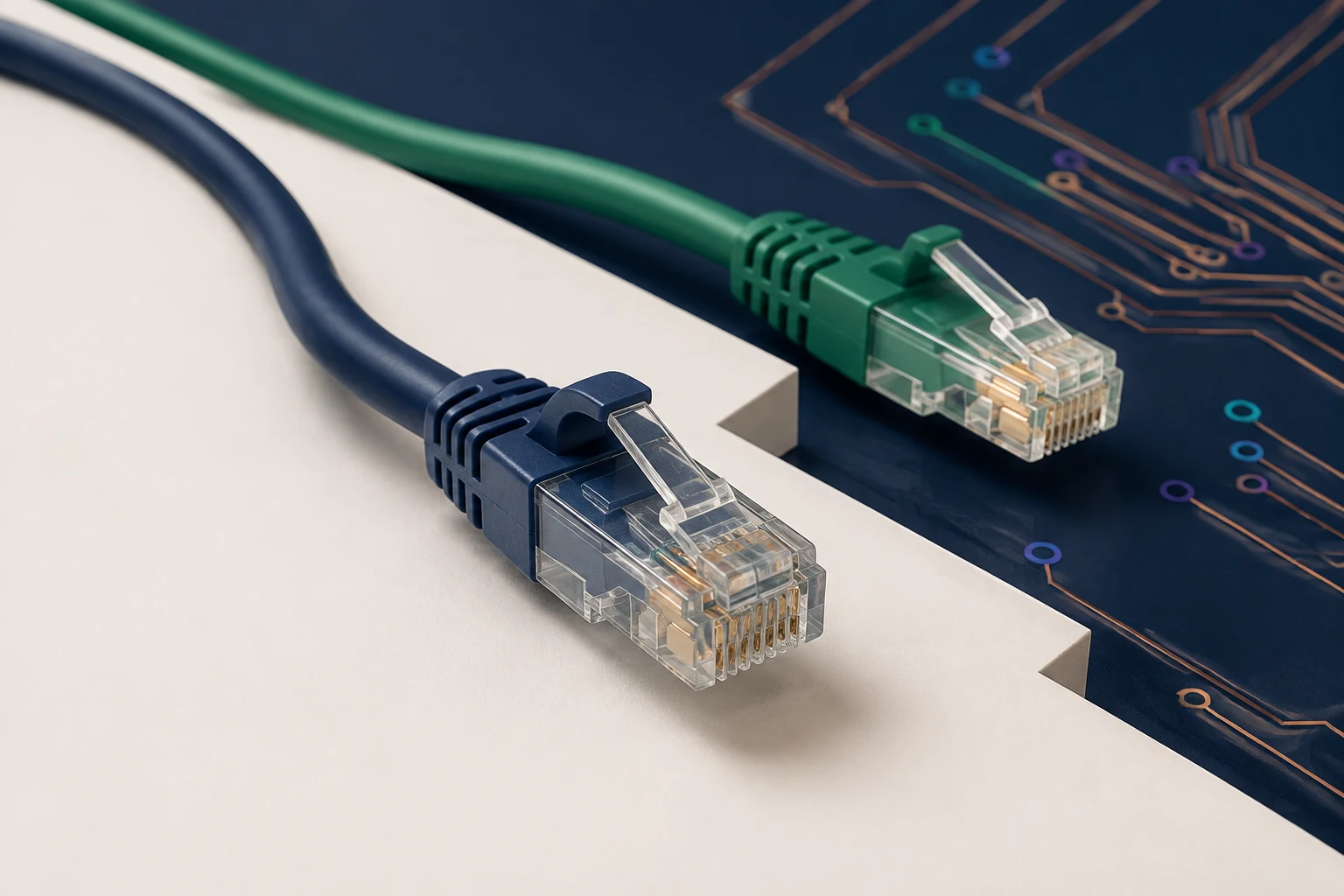
Higher-category cable cannot make a lower-rated socket meet a higher specification. Patch leads, connectors, workmanship and the fixed cable all affect the finished channel. For a specified performance level, ask for the installation to be tested against that requirement.
Jacket colour is not a category standard. A blue cable is not automatically Cat5e, and a purple cable is not automatically Cat6A. Read the markings and documentation.
What does “up to 100 metres” include?
The channel is the complete passive cable connection between two active network ports. In a conventional structured-cabling design, its 100-metre allowance includes up to 90 metres of fixed wiring plus a combined 10 metres of patch leads. It is not 100 metres inside the walls with unlimited extra leads at each end.
- SwitchNetwork port
- Patch leadTo patch panel
- Fixed cablingPanel to wall socket
- Patch leadSocket to equipment
- DeviceNetwork port
One typical 100-metre layout
patch lead90 m
fixed wiring5 m
patch lead
100 m complete channel
Source: Fluke Networks on permanent links and patch cords.
When the route gets longer or leaves the building
Measure the actual cable route, including rises, drops and the path around rooms. A garden office 20 metres from the house may need considerably more than 20 metres of cable.
For long routes or links between buildings, have the connection designed for the site. The decision may involve fibre, a wireless bridge or suitably specified external cabling. Check weather exposure, the cable sheath, mechanical protection and how the equipment will be powered. Choosing a higher Cat number does not settle those questions.
Twisted pairs and shielding, made visible.
A typical Ethernet cable of the types covered here contains four twisted pairs: eight insulated conductors in total. Twisting helps the signalling system resist interference. Some designs add foil or braid screens. The category describes performance; the shielding code describes construction.
Read the letters either side of the slash. The first part describes the screen around the whole cable bundle; the second describes the pairs. U means unshielded, F means foil and S means braid. TP means twisted pair.
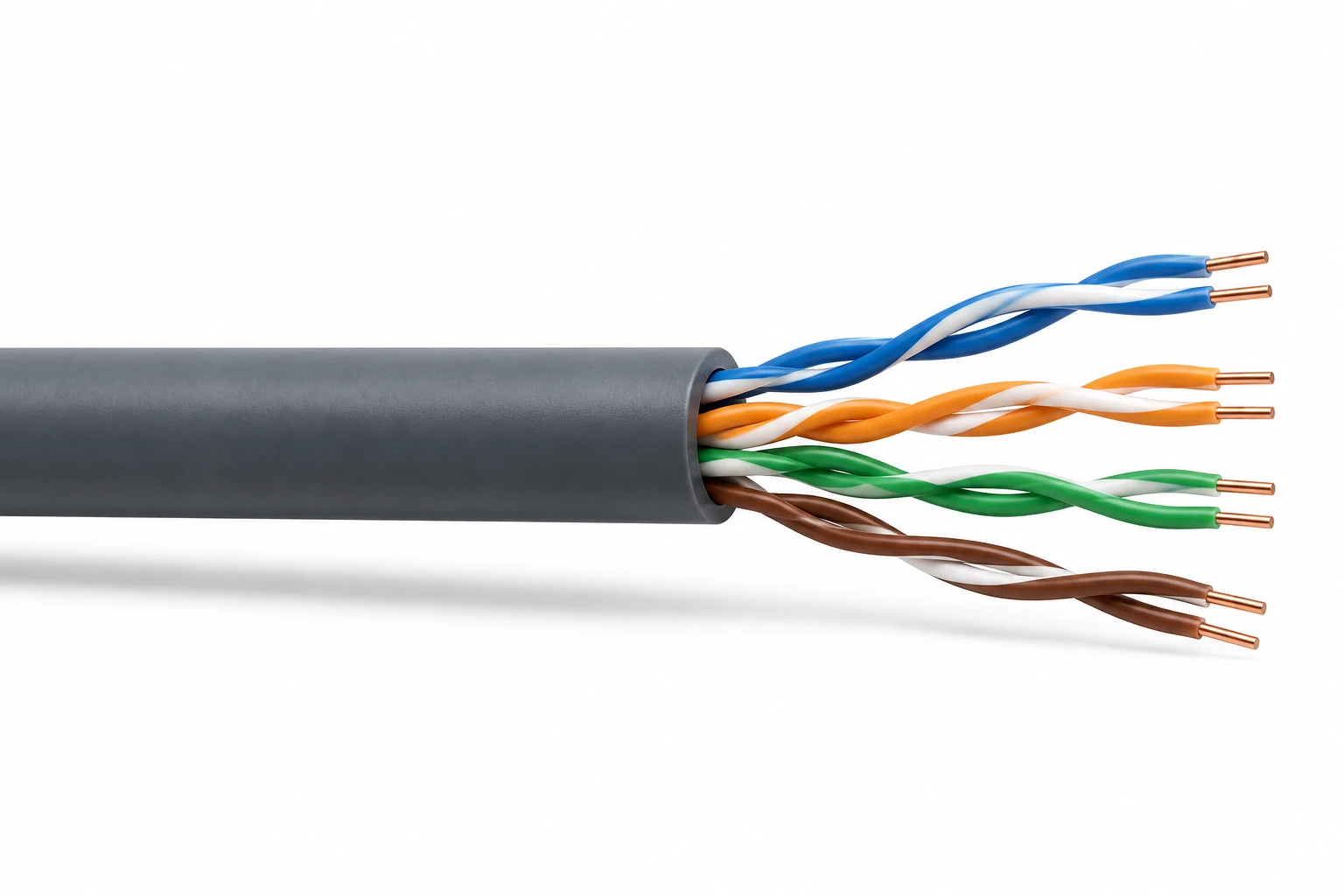
U/UTP: four pairs, no screen
Four twisted pairs emerge directly from the outer jacket. There is no foil around the bundle and no screen around each pair.
Outside to inside
Jacket → four twisted pairs
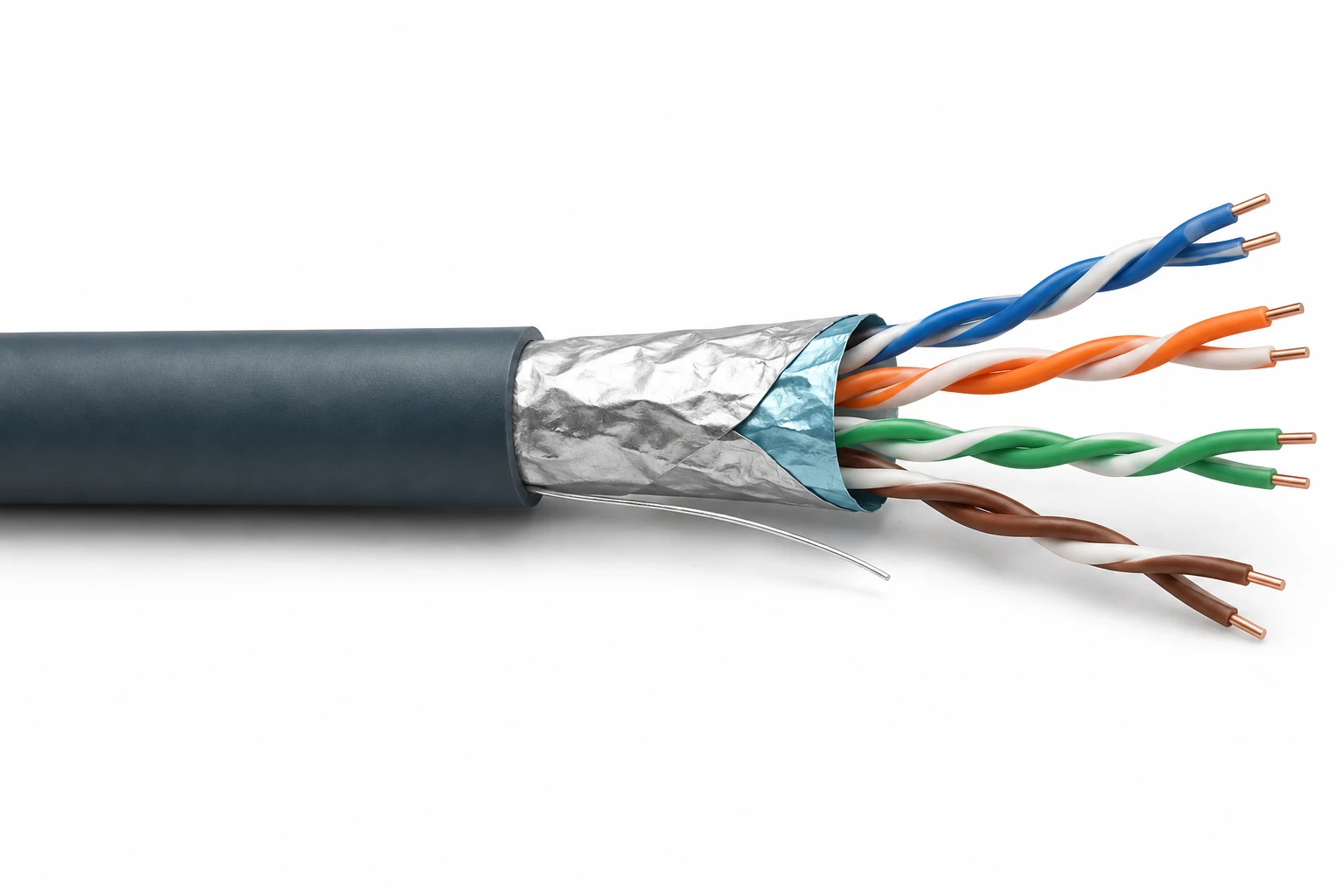
F/UTP: one foil around the bundle
The silver foil wraps around all four pairs together. The individual pairs underneath remain unshielded. The thin bare wire alongside the foil is a drain wire.
Outside to inside
Jacket → overall foil → four twisted pairs
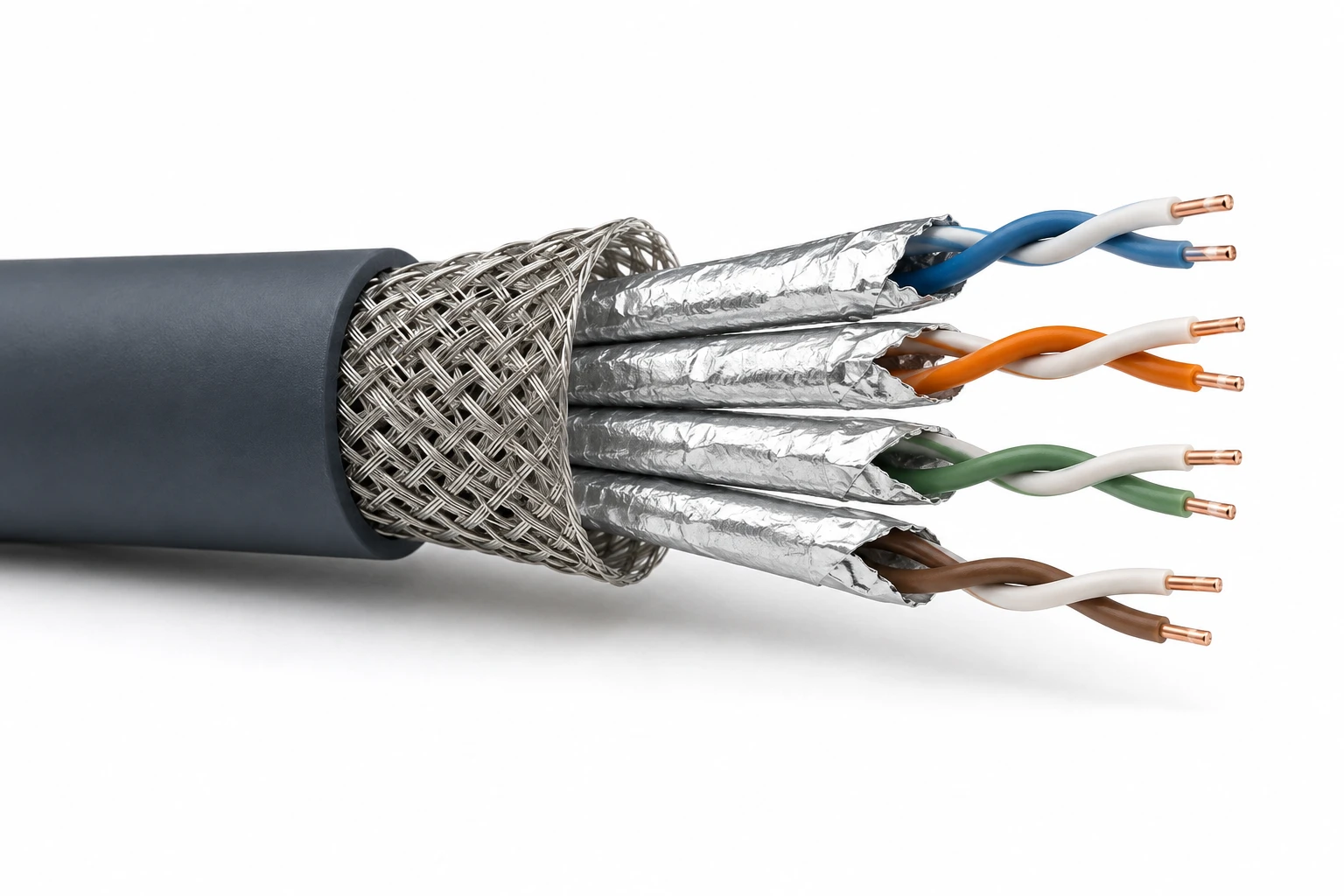
S/FTP: braid outside, foil around each pair
Look for the woven metal braid just inside the jacket. Beneath it are four separate foil sleeves, one around each twisted pair. The braid and the pair foils are different layers.
Outside to inside
Jacket → overall braid → individual pair foils → twisted pairs
Original realistic illustrations, created for this guide. Layers are opened out to make them visible; exact materials, separators and dimensions vary by product. These are explanatory cutaways, not termination instructions.
What stripped cable looks like in real photographs
Real foil is thin and crinkles when pulled back. Braid looks like a woven mesh. These photographs show those textures on actual cable samples.
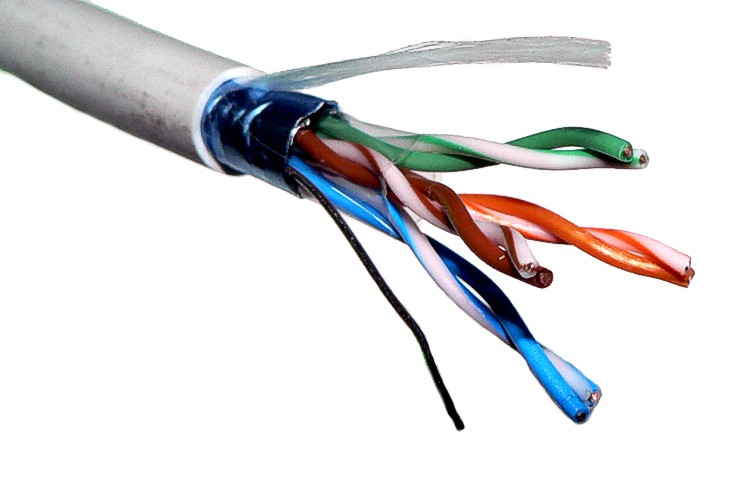

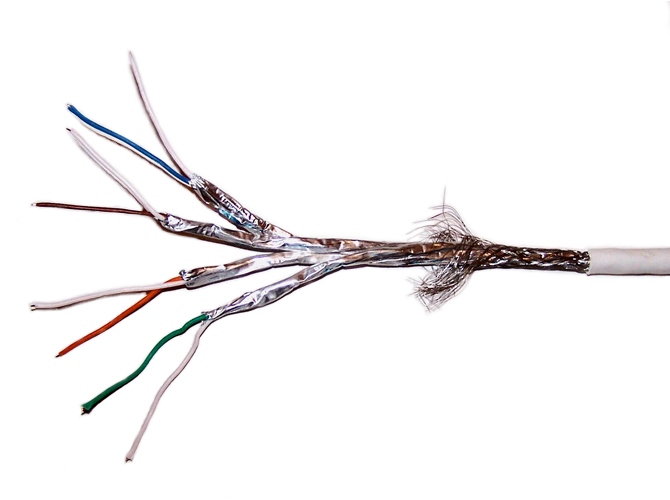

Other combinations exist, including U/FTP, with individually foil-screened pairs and no overall screen. Cat6A, for example, is available in both shielded and unshielded constructions. Do not use a picture of one cable as proof that every cable in its category looks that way.
Shielded cabling needs suitable connectors and the correct termination, bonding and earthing arrangements for the system. More metal around a cable is not a substitute for a well-planned route and good installation.
References: shielding designations; why shield continuity matters.
Solid or stranded copper?
Solid-conductor cable is normally used for fixed wiring. Stranded copper uses several finer wires within each conductor, making it more flexible for patch leads that move. Choose the cable and plug or socket as a compatible combination.
Copper-clad aluminium is different
CCA means aluminium with a thin copper coating. It is not the same as copper cable and does not meet the category-cabling conductor requirements discussed here. Its greater resistance is especially relevant when the cable also carries power.
References: solid and stranded conductors; copper-clad aluminium explained.
PoE: one cable, two jobs.
Power over Ethernet allows compatible equipment to receive data and electrical power through the same network connection. It is commonly used for WiFi access points, IP cameras and desk phones. A PoE switch or injector supplies power; the receiving device must support the appropriate system.
Data + electrical power
The category number alone does not tell you how much power a device can receive. Check the device’s required PoE type, the switch or injector’s supported output, the switch’s total power budget and the installed channel. Passive power injectors are not interchangeable with every standards-based PoE device.
Technical background: Fluke Networks’ PoE installation guide. Follow the actual equipment and cabling manufacturers’ instructions for the installation.
A slow connection needs a few checks.
If a link is slower than expected, establish where the limit is before buying a higher-category lead. These checks help narrow the problem; they do not replace certification of installed wiring.
- Check the ports at both ends. Confirm the supported Ethernet speeds for the exact router, switch and device. A television or other appliance may have a slower port than your computer.
- Read the negotiated link speed. The device’s network settings or managed switch can show whether it connected at 100 Mbps, 1 Gbps or another rate. This is different from an internet speed-test result.
- Try a known-good copper patch lead. Change one part at a time. Reseat the connectors and look for broken latches, damage or plugs that do not fit securely.
- Simplify the route where practical. A direct comparison with the same equipment can help separate a patch lead from wall wiring, sockets, couplers or intermediate network equipment.
- Investigate a persistent 100 Mbps link. Common 100BASE-TX Ethernet uses two pairs, whereas 1000BASE-T needs four. Pair faults are one possible reason for a lower speed, but port capabilities and settings also need checking.
- Test the installed link properly. A basic continuity tester can identify some wiring faults. It cannot prove that the complete channel meets Cat6A performance or will reliably support the intended Ethernet application.
For an access point, the wired link is only part of the story. Wireless coverage, interference and device capabilities still matter. Our WiFi & RF guides explain that side of the connection. If the symptom is a freezing television app, see streaming apps stuttering for checks that also consider the app and device.
The questions behind the cable label.
Will Cat8 make my broadband faster?
Only replacing a cable that was limiting the connection can remove that particular bottleneck. Cat8 does not increase your broadband package speed or change the capabilities of your router, switch or computer.
Should I remove working Cat5e?
Not simply because a higher category exists. Check whether the current installation supports what you need. If you are planning faster equipment, have the relevant links qualified before deciding that replacement is necessary.
Is Cat7 fake?
No. Cat7 is an ISO/IEC category, and complete Class F systems have specific requirements, including suitable connectivity such as GG45 or TERA. Retail marketing is sometimes confusing: the words “Cat7 RJ45” alone are not proof that the whole channel meets those requirements. Cat6A provides a familiar route to 10 Gigabit Ethernet with conventional RJ45 connectivity.
Does a shielded lead improve WiFi?
Shielding is about the cable’s electrical environment. It does not increase the radio signal from an access point. A reliable Ethernet connection can support an access point, but coverage depends on placement, the building, interference and the wireless equipment.
Does a flat or very thin cable perform the same?
Shape alone is not proof of performance or failure. Check the manufacturer’s declared category, conductor material, length limits and PoE suitability. Small-gauge leads can require different channel-length allowances. For permanent wiring, specify cable intended for that installation.
What should I ask for when having new wiring installed?
Agree the intended speed, category of the complete system, number and position of outlets, cable routes, PoE needs and any external links. Ask what testing will be performed and request labelled outlets and the relevant test results. This makes the handover useful for future upgrades and troubleshooting.
Where the technical guidance comes from.
This guide combines original WiFiSetup explanations and illustrations with manufacturer and industry-association guidance. The quick choices are practical starting points, not a design specification for every building.
- Ethernet Alliance: why 2.5 and 5 Gigabit Ethernet reuse existing cabling.
- Fluke Networks: qualifying Cat6 for 10GBASE-T.
- Fluke Networks: Cat7, connectors and channel requirements.
- Fluke Networks: patch leads within the complete channel.
- Fluke Networks: copper-clad aluminium cable.
- Fluke Networks: planning and testing PoE installations.
By WiFiSetup. Updated 8 September 2026. Technical references checked September 2026. Drawings are simplified explanations; always use the documentation for the exact cable, connectors and equipment being installed.